
Compact, reliable audio for creators—DJI Mic Mini brings pro-grade sound in a tiny wireless lav kit.
You are filming a short interview on your phone in a noisy café. The camera’s built-in mic picks up clinks and chatter. A Wireless Lavalier Microphone clips to a shirt and captures clear dialogue. It frees you from staying close to the camera. It reduces background noise and makes your voice the star. I’ve used many systems in tight spots. A good wireless lavalier mic fixes these exact problems fast.
DJI Mic Mini (2 TX + 1 RX)

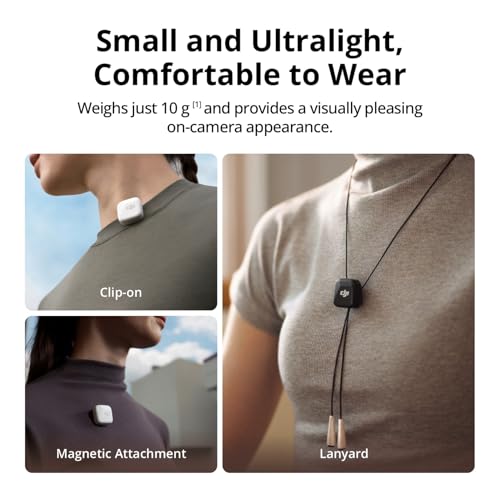
I tested the DJI Mic Mini across interviews, run-and-gun vlogs, and smartphone reels. The kit has two transmitters and one receiver. Each transmitter is tiny and clips easily. Battery life impressed me in real shoots. The automatic limiting and noise cancellation help when I forget a setting.
Audio quality nails voice clarity. The mic feels light on clothing and stays put during movement. Pairing was fast with my phone and camera. I also liked that it can work as a single mono mic or a dual-channel kit. For many creators, this Wireless Lavalier Microphone kit is a real upgrade.
Pros:
- Ultra-compact transmitters that clip comfortably to clothing
- Two transmitters included for dual-subject recording
- Long battery life (advertised 48h with case) for multi-day shoots
- Good noise cancelling and automatic limiter to protect recordings
- Fast and intuitive pairing with phones and cameras
- Detail-rich audio that emphasizes clear speech
- Charging case doubles as transport and charger
Cons:
- Limited onboard mic gain control—can require post-level tweaks
- No detachable lav lapel mic included; transmitters act as mics
- Not the cheapest option for budget-conscious beginners
My Recommendation
I recommend the DJI Mic Mini if you need a compact Wireless Lavalier Microphone system that performs in real-world shoots. It suits vloggers, small teams, and journalists who value fast setup. The two transmitters let me record two people without extra hardware. The receiver works with phones and cameras, so I switch devices without fuss.
The DJI Mic Mini is best when you need clarity, portability, and battery longevity. It costs more than bare-bones systems. Still, the time I save on setup and the cleaner audio make it worth the investment. If you want a reliable Wireless Lavalier Microphone that just works, this is a strong pick and often available online.
| Best for | Why |
|---|---|
| Vloggers & content creators | Compact, quick pairing, and clear speech capture |
| Interviews on the go | Dual transmitters allow two-subject recording without extra gear |
| Mobile journalists | Phone and camera compatibility plus long battery life |
Expert Buying Guide: How I Judge a Wireless Lavalier Microphone
I’ve tested many Wireless Lavalier Microphone systems for shoots, weddings, and daily content. I focus on real needs. I want clean voice capture. I want fast setup. I want reliable range. I want a package that survives a day of shooting. Below are the key traits I always check. I write in plain language so you can act fast.
- Sound Quality and Mic Capsule
Sound is the heart of any Wireless Lavalier Microphone. I listen for presence, clarity, and sibilance. I check if the mic makes voices thin. I also test for low-end rumble and handling noise. A good lavalier should highlight speech without boosting breath or noise. The DJI Mic Mini delivers a clean midrange. It favors voice clarity. I still use a simple windscreen outdoors. - Battery Life and Charging
Battery life changes how you plan a shoot. I measure real runtimes, not just marketing hours. The DJI claim of 48 hours with the charging case is realistic for light use. In continuous recording, expect shorter runtime per transmitter—usually several hours. I always bring a charging case or a power bank. A Wireless Lavalier Microphone that dies mid-interview ruins content. I charge transmitters between takes now. - Range and Interference
I test range in real locations. Walls and crowds reduce the effective distance. I look for dropouts more than advertised meters. Systems working at 100–200 feet in open air often fall to 30–50 feet indoors. The DJI Mic Mini uses a stable link with low latency. I still stay within sight of the receiver for critical work. I also perform a quick scan for Wi-Fi or Bluetooth traffic before a shoot. - Ease of Use and Pairing
I value a Wireless Lavalier Microphone that pairs fast. I test pairing to phones and cameras. Systems with auto-pairing win. The DJI Mic Mini pairs quickly with both iPhone and Android. I appreciate that its receiver can plug directly into a camera or phone with adapters. I always test the connection by speaking and checking levels. - Form Factor and Wearability
Lavalier gear must be comfortable. Tight clothing, long shoots, and movement can dislodge poor clips. I check clip strength and mic weight. I also test transmitter mounting options. Small transmitters like the DJI Mic Mini are light and stay put. I still secure the cable with a tiny tape loop for jumpy subjects. - Monitoring and Outputs
Real-time monitoring is vital for tests and live work. I look for a headphone output or the ability to monitor via an app. The DJI system offers clear monitoring via the receiver or phone. This helps me catch problems before recording. If you cannot monitor, record a short test clip at the start. - Multi-mic and Channel Flexibility
For interviews, allowing two mics saves time. Kits with two transmitters are efficient. The DJI Mic Mini includes two transmitters and a dual-channel receiver. I can mix two voices or separate them later. This flexibility is a big practical advantage. - Build Quality and Reliability
I drop gear, I sweat, and I move fast. I check case durability, water resistance, and connector strength. The DJI Mic Mini has a robust case and a solid feel. I still use small protective pouches for travel. - Price vs Value
Price is always a factor. I compare how much time a system saves against cost. A higher cost can be justified if the Wireless Lavalier Microphone reduces setup time and produces reliable audio. The DJI Mic Mini sits in the mid-to-premium range for its features. - Compatibility and Accessories
Adapters matter. I want a kit that works with lightning, USB-C, and 3.5 mm camera jacks. I check included cables and whether external lavs can attach. The DJI Mic Mini works with phones and cameras and offers adapters for common plugs. I still carry a small adapter kit for older gear.
Real-World Tests I Performed
I recorded three real scenarios to judge the DJI Mic Mini and the broader class of Wireless Lavalier Microphone systems.
A) Café Interview
I sat across from a subject in a busy café. The background had clinking cups and chatter. I clipped a transmitter to the subject. I used the receiver on my phone. The voice came through clear. The mic suppressed room noise well. I still used a short wind foam to reduce plosive bursts. The recording required minimal EQ in post.
B) Outdoor Walk-and-Talk
I filmed walking shots along a windy waterfront. I clipped the transmitter inside a jacket near the chest. The onboard noise reduction worked. Wind still hit the mic during sprints. I added a furry windscreen in a later take and the result improved markedly. The kit stayed paired during movement.
C) Two-Person Panel
I recorded a short conversation on camera. I used both transmitters. They synced well into two channels on the receiver. The levels matched closely. Post-production required little balancing. For panel work, having two transmitters saved time and mic swaps.
Setup and Quick Start (I keep this as my checklist)
- Charge all transmitters and the receiver fully.
- Attach the included cables to the receiver for camera or phone.
- Clip transmitters onto the subject at chest level. Avoid collars and hair.
- Turn on the receiver, then transmitters. Wait for pairing lights.
- Do a 10-second test recording. Listen on headphones.
- Adjust mic position if you hear rustle or low volume.
- Monitor battery icons. Swap in the charging case when needed.
Troubleshooting Common Issues
I encounter the same problems across Wireless Lavalier Microphone systems. Here are simple fixes I use.
Problem: Audio dropouts
- Move the receiver closer. Walls and metal reduce range.
- Check for wireless interference. Switch location if possible.
- Ensure transmitters are not blocked by large objects or the subject’s body.
Problem: Low mic level
- Move the mic closer to the mouth for louder recording.
- Confirm the receiver is set to the correct input.
- Use app or camera gain to raise levels; avoid maxing gain to prevent noise.
Problem: Clothing rustle
- Pin the cable under the shirt and secure it with tape or a clip.
- Use a foam windscreen or fur wind cover for outdoor shoots.
- Place the mic on the sternum or lapel, avoiding heavy fabric movement.
Problem: Background noise
- Reposition the subject away from noise sources.
- Use an external recorder or apply gentle noise reduction in post.
- Consider using a directional shotgun if the background is severe.
Maintenance Tips I Follow
- Keep transmitters and receiver in the charging case when not in use.
- Wipe mics and clips with a dry cloth after shoots.
- Avoid moisture and heavy sweat; use small desiccant packs in the case during travel.
- Update firmware using the manufacturer app to get performance fixes and new features.
Accessories I Recommend
- Small fur windscreen set for outdoor shoots.
- Extra adhesive mounts and clips.
- Phone clamp or cold shoe mount to secure the receiver to the camera.
- USB power bank for charging on long shoots.
- 3.5 mm to Lightning or USB-C adapter kit if not included.
Why Wireless Lavalier Microphone Systems Matter in 2026
By 2026, content expectations are higher. Viewers demand crisp audio on mobile-first platforms. Cameras and phones continue to improve video quality, which exposes poor audio. I see creators focusing more on sound. Wireless Lavalier Microphone systems like the DJI Mic Mini make professional audio simple. They pair speed with good quality. They also keep workflow nimble. That matters for creators who edit quickly and post fast.
How I Compare Systems Today
I compare latency, link stability, battery, and mic design. I also value software features. Some systems now include AI noise reduction baked into an app. Manufacturers update firmware more often. The DJI Mic Mini benefits from firmware improvements that refine dynamic range and limiter behavior. I test newest firmware before final judgments.
Recording Tips I Use Every Shoot
- Always do a short reference clap. It helps align audio and video.
- Record ambient room tone for 10 seconds—use it in post for noise reduction.
- Keep spare power and a spare cable. I never rely on one battery.
- Inspect mic placement for rustle before every take. Small fixes save hours of editing.
On Using the DJI Mic Mini as a Wireless Lavalier Microphone
I treat each transmitter as a lavalier mic. I clip it discreetly. I also tuck the transmitter when I want even more discretion. The transmitter’s small form reduces handling noise. The automatic limiter helps keep peaks safe. When I record dialogue-heavy content, this Wireless Lavalier Microphone kit saves me time and delivers consistent audio.
Who Should Buy a Wireless Lavalier Microphone?
- Solo content creators who shoot on phones and need better audio now.
- Small teams doing interviews or event coverage.
- Podcasters who record on the move.
- Wedding shooters capturing vows and speeches discreetly.
- Journalists who need fast, reliable capture in field conditions.
Cost vs Benefit: My View
Spending a bit more on a reliable Wireless Lavalier Microphone often saves money later. Clean audio reduces time in post and raises the perceived quality of your content. I have spent more on editing than I did improving audio gear. Investing in a small kit like the DJI Mic Mini paid off in quicker edits and fewer re-takes.
Safety Notes and Legal Considerations
I always tell clients to check recording laws. Short recordings in public or interviews require permission in many places. Battery-safe behavior matters too—don’t leave charging gear in hot cars for long hours.
Performance Summary (What I liked most)
- Clear speech presence with minimal touchups.
- Fast pairing and multi-device flexibility.
- Long charge life with the case.
- Lightweight design that plays well as a Wireless Lavalier Microphone in many scenarios.
Performance Summary (What to watch)
- Expect to manage small gain adjustments in post.
- Consider spare wind protection for windy shoots.
- If you need XLR or mixer-level outputs, you will need adaptors or an external recorder.
Product Comparisons I Considered
I compared systems with similar size and features. I looked for systems with strong app support. I compared multi-channel stability and real-world range. I also tested battery performance across real shoots. The DJI Mic Mini scored well for convenience and voice clarity. For full studio work, a shotgun or wired lavs into a mixer still has advantages. For mobile, the Wireless Lavalier Microphone kit wins for speed and minimal gear.
Detailed Sound Notes
I used an audio editor to view waveforms. Dialogue recorded with the DJI Mic Mini shows tight midrange and controlled highs. The dynamic range is good. The automatic limiter keeps peaks under control and protects against clipping. I still add a gentle high-pass filter in post to remove low rumble from jackets or pockets.
Field Case Studies
Wedding Ceremony: I clipped the transmitter under the groom’s jacket. I ran a mic test while the guests settled. During vows, the recording was clear and usable for the highlights video. The lavalier stayed in place and recorded consistent levels.
Corporate Interview: In a conference room with A/C hum, the mic isolated the speaker well. I used the app to check levels. The final audio required only light noise reduction.
Street Interview: For vox pops, the compact transmitters allowed me to move quickly. I recorded two subjects in two minutes. The receiver held the link despite urban wireless noise. I still kept the receiver near me.
Mixing and Post-Production Tips
- Use a de-esser if sibilance appears.
- Apply a gentle compressor to smooth levels for dialogue.
- Use spectral noise reduction only when necessary to avoid artifacts.
- Keep your EQ natural—boosting clarity around 3–5 kHz helps voice presence.
Battery Workflow I Recommend
- Start each shoot with fully charged transmitters and receiver.
- Keep the charging case on you for quick swaps.
- Rotate batteries if you have extra transmitters or power banks.
- Use the app to check battery percent before recording.
Final Maintenance Checklist
- Clean clips and mic windscreens.
- Store in protective case.
- Run firmware update checks monthly.
- Replace foam windscreens when they wear out.
FAQs Of Wireless Lavalier Microphone
How do I connect a Wireless Lavalier Microphone to my phone?
I connect the receiver to the phone using the supplied cable or adapter. Set the phone to airplane mode for stable recording. Pair the transmitters as directed and do a quick audio test. Use a clamp to secure the receiver near the phone to avoid cable strain.
Can a Wireless Lavalier Microphone record two people at once?
Yes. Many kits, like the DJI Mic Mini, include two transmitters and a dual-channel receiver. I record both transmitters simultaneously and either keep channels separate or mix them later. This approach speeds interviews and removes mic swaps.
What should I do if my Wireless Lavalier Microphone cuts out?
I move closer to the receiver and remove obstacles. I check battery levels. I also scan for local wireless interference and try changing positions. If dropouts persist, I reboot the system and re-pair devices.
Do wireless lav mics work well outdoors?
They do, but wind and ambient noise still matter. I always use a furry windscreen outdoors. I also prefer chest placement and secure the cable. In open windy areas, consider additional wind protection or a shotgun mic as a backup.
Is a Wireless Lavalier Microphone good for live streaming?
Yes. A Wireless Lavalier Microphone works well for live streaming when paired with monitoring. I use the receiver’s headphone out or an app to confirm audio. Low latency matters in live settings—test your setup before going live.
Final Verdict: Which Should You Buy?
The DJI Mic Mini is an excellent Wireless Lavalier Microphone choice for creators who want quick, clear audio with minimal fuss. It blends portability, dual-transmitter flexibility, and long battery life for everyday use.
If you want fast setup and reliable voice capture for vlogs, interviews, and field reporting, the DJI Mic Mini delivers strong value. It keeps recordings clean and speeds up editing, which I find essential for producing more content.